AI VA claim assistant for your own records: ask questions of your files, get the statement you wrote checked against VA’s rating rules, and organize your own evidence. See what the assistant does
Build your VA claim and keep every dollar of your benefits
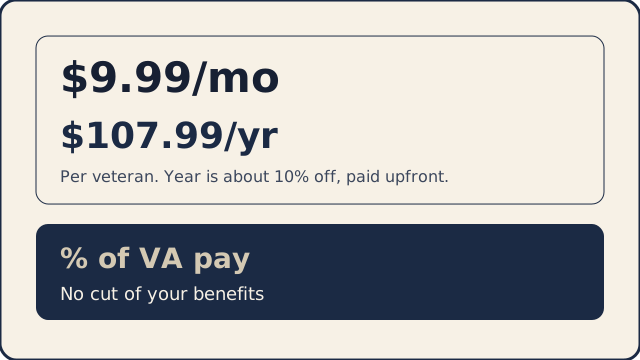
Veterans use My Claim to organize evidence and check statements against the VA’s published rating rules, in plain words. One flat price: $9.99/month or $107.99/year.
Keep every dollar of the benefits you’ve earned. One flat price: $9.99/month or $107.99/year. Your VA back pay and monthly payments stay yours.
Start My Claim · See how records and statements fit together
Already have an account? Sign in
Try it free for 14 days.
Or $107.99/year (about 10% off).
A veteran built this after seeing how hard a VA claim is to follow. Some claim companies take a cut of back pay. Here, one flat price keeps that money yours. You sort your own records, see your next step, and check your own statements. You file with VA or a free VSO. Keep every dollar of the benefits you’ve earned.
Where most veterans get stuck
Waiting on the VA and unsure what to do next
My Claim keeps a next-step checklist, so you can use the wait to get ready.
Worried a claim company takes a cut of your back pay
One flat price keeps every dollar of your benefits yours. We help you organize, and you file.
Unsure which evidence matters
The evidence checklist lines up your records with what the VA’s published rating rules ask for.
- Built on the VA’s own published rules
- You stay in control: you review and submit your claim
- Keep every dollar of the benefits you’ve earned
- Free calculator, rates, and guides you can use right away
Look up a condition
See the published VA rating levels for a condition in plain English, with the exact rule-book words. Use it right away.
Education only. This matches the words you typed to names in the VA rating schedule (38 CFR Part 4). It is not a diagnosis, not a rating, and not a prediction. Nothing you type is saved. Browse all conditions by body system.
My Claim · Migraine (Example)
Fictional example · not a real veteran. Example only. Not a real veteran. Not a rating. Not real records.
3 of 6 steps organized Sample progress. Not a VA rating.
- Tasks
- Evidence
- Deadlines
- What’s Next
Tasks
- Done — Start the claim: This example lists migraine. It is not a real veteran and not a diagnosis.
- Done — Migraine requirements: In plain words, from the VA's published rating schedule for migraine (38 CFR 4.124a, code 8100).
- Done — Records you already have: Each record is sorted by what it shows. Missing stays missing.
- Now — Personal statement: Write it in your own words. We can flag a detail the migraine rating rules ask about. The words stay yours.
- Not yet — Notice date and deadline: Add the date you filed your notice of claim. The one-year clock starts then, not when you open this site.
- Not yet — Review, then you file: Check everything in one place. Then you or an accredited representative file on VA.gov.
Evidence
- In this example — Sick-call note, 2014
- In this example — Neurology visit, 2023
- In this example — Headache log, last 3 months
- Missing in this example — A statement from someone who saw the attacks
Deadlines
Notice date in this example This example uses a notice date of January 15, 2026. One year from that date is January 15, 2027. The clock starts when you file a notice, not when you open this site. This date is not yours.
What’s Next
Finish your personal statement Write it in your own words. We can flag a detail the migraine rating rules ask about. The words stay yours.
What you use in My Claim
The workspace is the main door. These are the pieces on the page while you build the claim.
My Claim workspace
What’s Next, your progress, and your deadlines sit together while you build the claim.
What’s Next
One next step is named on the page. Open it and do that step.
Progress and deadlines
See which steps are done. The one-year clock starts when you file a notice, not when you open this site.
Evidence and statements
Sort records you already have. Write statements in your own words. The questions follow the VA’s published rating rules, in plain words.
Ask My Records
Ask about pages you stored. A quote appears only when those exact words are on the page, with the page number.
Statement coach
You write the statement. It flags gaps and vague wording. It never writes facts for you.
Conditions that can link
List a condition you believe is already connected to your service. My Claim shows a short reading list from published VA rules about conditions often discussed with it. You choose what to look at.
Calendar and schedule
Keep the notice year in view. Add appointments you already have.
How it works
Six steps in My Claim. What’s Next, your progress, and your deadlines stay in view.
Start
Open My Claim and name what you are working on. What’s Next is on the page.
Understand
Read what a claim like this asks for, in plain words, from the VA pages we cite.
Organize
Sort records you already have. Missing stays missing. Unknown stays unknown.
Build
Keep evidence, your words, and the right forms together. You write the statement. We ask about a detail the rating rules mention.
Schedule
Stay on schedule. The clock starts when you file a notice, not when you open this site. Add dates you already have.
Review
Review what you built. You or an accredited representative file on an official VA channel.
One year from the notice you file, not from the day you open this site. You own that clock. File the notice on VA.gov
Already have VA records?
Optional. You can start My Claim without a C-file. If you already have copies, Ask My Records, a Timeline, a Record Map, or the Decision Letter Explainer help you read them. The C-file guide shows how to request a copy yourself, then upload it here if you want. A checklist shows the steps you do yourself: a VA.gov account, a notice of a claim, medical records and your personnel file, statements, and sending the claim.
C-file
Copies you already have. The guide shows how to request one yourself, then upload it here if you want.
Ask My Records
A quote appears only when those exact words are on the page.
Timeline
A date only when the page writes one.
Record Map
Sections already in the index. Unknown stays Unknown.
Decision Letter Explainer
Read your letter next to one published rule.
What’s Next, progress, deadlines, evidence, and statements in plain words. $9.99/mo or $107.99/yr.
Try it free for 14 days. Then $9.99/mo (or $107.99/yr).
Free tools, then ask your own records
- Free combined-rating calculator — Numbers you type. Not your rating.
- Benefit-rate lookup — VA’s published monthly table. Not your award.
- Free C-file guide — Organize copies you already have.
Read a short guide. You file the notice. Stay on schedule. Sort records you already have.
Notice of a claim · Stay on schedule · Fully developed claim checklist · Learn library
AI VA claim assistant guides
- AI VA claim assistant: what it does and what it costs
- How to prepare a VA disability claim with AI
- AI help with a VA disability claim: what it can and cannot do
- VA claim evidence checklist
- AI VA claim tools compared
- VA C-file review tool
- VA personal statement (VA Form 21-4138)
- VA claim help options compared
- VA decision letter explained
Your files stay yours
Your files are encrypted when we store them. No outside AI company sees them unless you press an optional AI button, and we never use them to train AI. You can download or delete them any time.
Short answers on the workspace, the price, and filing.
Start in My Claim.
What’s Next, your progress, deadlines, evidence, and statements stay together while you build the claim.
Start My Claim · See how records and statements fit together
Veterans Benefits AI (veteransbenefitsai.com), by MAOMA Enterprises LLC